

Older desktop processors are enjoying a massive resurgence. Whether you want to repurpose an aging system, build a budget gaming rig, or evaluate used hardware value, knowing how to pair a legacy CPU with the right components is essential.
Hardware architecture moves quickly. Placing a modern graphics card alongside an older processor can lead to severe system bottlenecks. This complete guide breaks down everything you need to know about legacy processor hierarchies, motherboard socket matching, bottleneck calculations, and secondhand CPU evaluation.
What Defines a Legacy CPU in 2026?
A legacy CPU generally refers to any desktop or laptop processor that is no longer part of the current or previous generation manufacturing lines. In today’s hardware landscape, processors built prior to 2022 fall into the legacy category.
Typical Use Cases for Older Processors
- Budget Gaming Systems: Pairing older 6-core or 8-core CPUs with mid-range graphics cards for 1080p gaming.
- Home Servers and NAS: Utilizing high-core-count older chips for media streaming and local data storage.
- Secondary Workstations: Running light office applications, web browsing, and basic photo editing.
- Hardware Recycling and Gold Recovery: Sourcing vintage ceramic processors (like older Pentium or Athlon chips) for industrial precious metal extraction.
Legacy CPU Benchmark Hierarchy Overview
Understanding where an older chip sits in the performance hierarchy prevents you from overspending on an overpowered graphics card.
Performance Tiers Across Generations
- Pre-2018 Processors (e.g., Intel 4th–7th Gen, AMD FX Series): Limited to DDR3 or early DDR4 memory. Best suited for basic desktop tasks, retro gaming, or lightweight home servers. High risk of bottlenecking any modern GPU.
- 2018–2020 Processors (e.g., Ryzen 2000/3000, Intel 8th–10th Gen): Solid multi-core capabilities. They handle mid-range GPUs well at 1080p and 1440p resolutions.
- 2020–2022 Processors (e.g., Ryzen 5000, Intel 11th–12th Gen): Highly capable modern legacy chips. Processors like the Ryzen 5 5600 or Core i5-12400F remain exceptional value picks for current graphics cards.
How to Calculate CPU and GPU Bottlenecks
A hardware bottleneck happens when one component limits the maximum performance potential of another. In legacy builds, the CPU is usually the limiting factor.
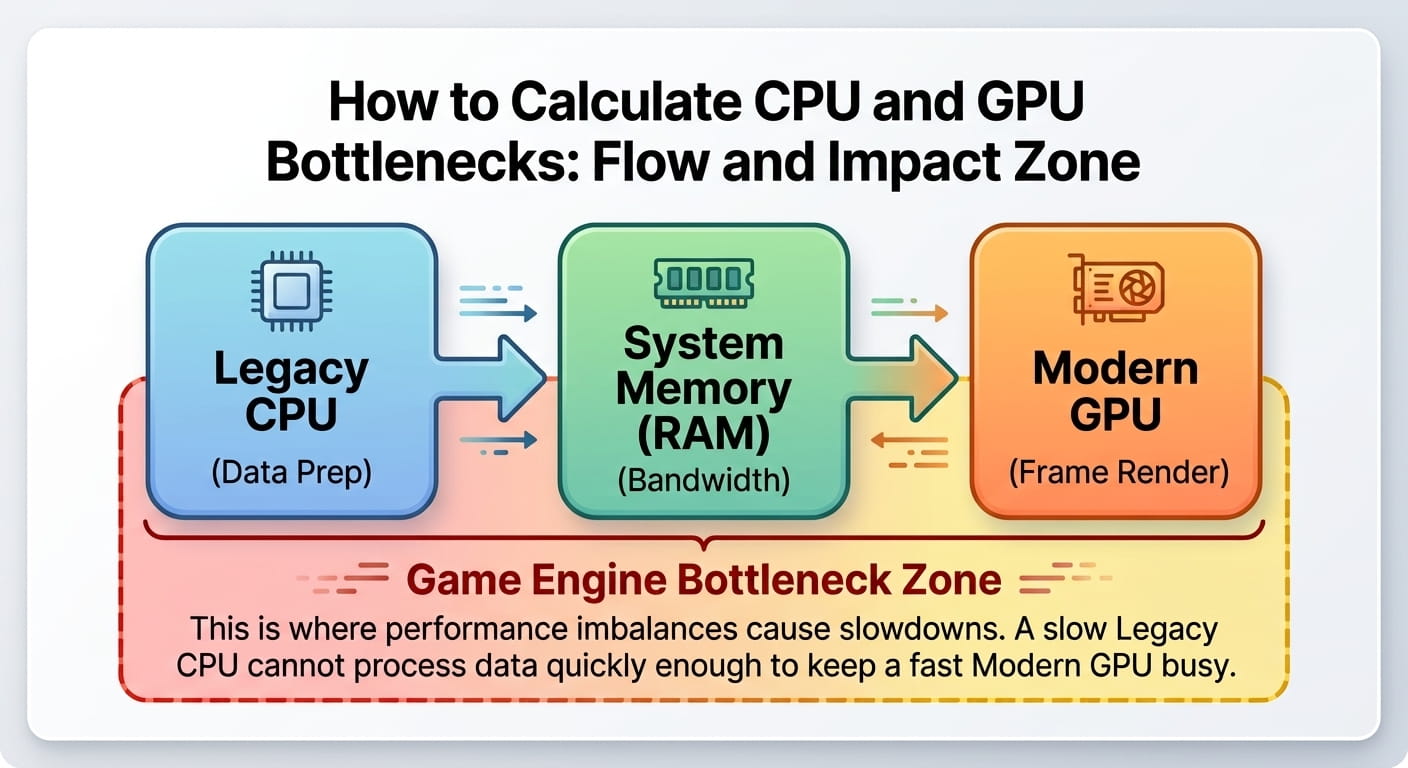
Key Factors That Cause Performance Throttling
- Resolution Scale: Lower resolutions like 1080p place heavier loads on the processor. Raising the resolution to 1440p or 4K shifts the workload back to the graphics card, reducing the CPU bottleneck.
- Single-Threaded vs. Multi-Threaded Power: Older chips may have many cores, but low single-core Instructions Per Clock (IPC) performance can choke modern high-framerate games.
- PCIe Generation Limits: Legacy motherboards using PCIe 3.0 can restrict the bandwidth of newer GPUs that rely on PCIe 4.0 x8 or x4 configurations.
Practical PC Build Pairings for Legacy Processors
Pairing components correctly ensures you get full value out of every dollar spent. Here are effective pairings for popular legacy CPUs:
| Legacy CPU | Recommended GPU Match | Target Resolution | Expected Performance Profile |
| AMD Ryzen 5 5600 | RTX 4060 / RX 6700 XT | 1080p / 1440p | Excellent high-refresh 1080p gaming; minimal bottleneck. |
| Intel Core i5-12400F | RTX 4070 / RX 7800 XT | 1440p | Great balance; high graphics settings at 1440p. |
| AMD Ryzen 7 3700X | RTX 3060 Ti / RX 6600 XT | 1080p | Solid overall performance; slight CPU limitations in esports titles. |
| Intel Core i7-8700K | GTX 1660 Super / RTX 3060 | 1080p | Dependable budget entry-level setup. |
Motherboard and Socket Compatibility Guide
You cannot install a legacy CPU into just any motherboard. Physical socket matching and chipset support are strictly required.
Socket Types Explained
- LGA (Land Grid Array): Pins are located inside the motherboard socket. Commonly used by Intel and modern AMD AM5 motherboards.
- PGA (Pin Grid Array): Pins are located on the underside of the processor. Used by older AMD sockets like AM4 and AM3.
Popular Legacy Sockets and Chipsets
- AMD Socket AM4: Supports a vast range of CPUs from early Ryzen 1000 series up to the Ryzen 5000X3D chips. (B450, B550, X570 chipsets).
- Intel Socket LGA 1200: Supports 10th and 11th Gen Intel CPUs. (B460, B560, Z490 chipsets).
- Intel Socket LGA 1151: Split across two non-compatible revisions for 6th/7th Gen and 8th/9th Gen chips.
BIOS Updates for CPU Upgrades
When upgrading a legacy motherboard with a newer processor from the same socket generation, you often need to flash the BIOS to the latest version before installing the new chip.
Evaluating Component Ecosystem Compatibility
When building around an older processor, you must verify that all neighboring hardware components align properly.
- RAM (System Memory): Check whether your legacy CPU requires DDR3 or DDR4 memory. Ensure the memory speed matches the maximum supported memory controller frequency.
- Power Supply Unit (PSU): Older CPUs often draw more power and generate higher heat than modern efficient chips. Verify your PSU has sufficient wattage and proper PCIe power connectors.
- Cooling Requirements: Review the Thermal Design Power (TDP) rating of the processor. High-tier legacy chips (like Intel K-series or AMD FX-series) require beefy aftermarket air or liquid coolers.
Buying Used CPUs: Market Analysis & Scrap Value
The secondhand market for desktop processors is massive. However, purchasing older hardware requires careful inspection.
Pros and Cons of Used Processors
Pros:
- Exceptional price-to-performance ratio for budget builds.
- Processors rarely fail physically unless severely overvolted.
- Wide availability on open secondhand marketplaces.
Cons:
- No manufacturer warranty protection.
- Lack of modern features like PCIe 5.0 or official Windows 11 support on very old models.
- Risk of bent pins on PGA-style processors.
Industrial Value and E-Waste Recycling
Very old processors (such as Intel Pentium Pro, Core 2 Duo, or vintage AMD Athlon chips) hold functional market value purely for gold recovery and precious metal refining. Scrap processors are categorized by ceramic density and pin gold-plating purity within the industrial e-waste recycling sector.
Step-by-Step Decision Framework for Older CPUs
- Identify Your Primary Goal: Determine if the system is for gaming, office tasks, server storage, or parts harvesting.
- Check Your Existing Motherboard: Identify the socket type, chipset, and BIOS update availability.
- Calculate the GPU Balance: Select a graphics card that matches the single-threaded rendering speed of the processor to avoid severe bottlenecks.
- Inspect Physical Condition: Check PGA chips for bent pins and LGA chips for damaged contact pads.
