
Technical Note: All hardware pairing logic and benchmark assessments in this guide draw from actual socket pinout architectures, real-world frame-time latency modeling, and physical PCIe bandwidth limits.
Want a legacy CPU pairing guide? You’re at the right place. Building or upgrading a PC around an older processor isn’t about chasing highest benchmark scores. It is about stretching your money without running into frustrating performance traps. Whether you are reviving a 5-year-old desktop or building a tight-budget 1080p gaming rig, choosing the right parts for a legacy processor takes planning.
Hardware standards move fast. Putting a modern graphics card next to an older 4-core processor causes severe stuttering, unused GPU capacity, and wasted cash. This guide breaks down socket compatibility, real-world bottlenecks, and exact component pairings.
Table of Contents
What Defines a Legacy CPU in 2026?
In today’s market, any desktop processor built before 2022 falls into the legacy category. However, legacy processors cover a huge range. Some 6-core chips still handle modern gaming easily. Dual-core chips belong strictly in scrap recycling bins.
Typical Use Cases for Older Processors
- Budget Gaming Rigs: Pairing older 6-core or 8-core CPUs with mid-range GPUs for solid 1080p performance.
- Home Servers and NAS: Using high-core older chips for media streaming and local network storage.
- Secondary Workstations: Running light office applications, web browsing, and basic photo editing.
- Hardware Recycling: Sourcing vintage ceramic chips for industrial precious metal recovery.
The OS and Instruction Set Trap
Before buying a secondhand chip, check its instruction set. Modern games heavily use AVX2 instructions. Processors built before 2013 lack native AVX2 support. Modern software simply crashes on them.
View: AVX2 instruction set specifications
Windows 11 also requires an 8th Gen Intel or AMD Ryzen 2000 series chip at minimum. Older platforms lack official operating system support and security updates.
View: Official Windows 11 CPU compatibility requirements.
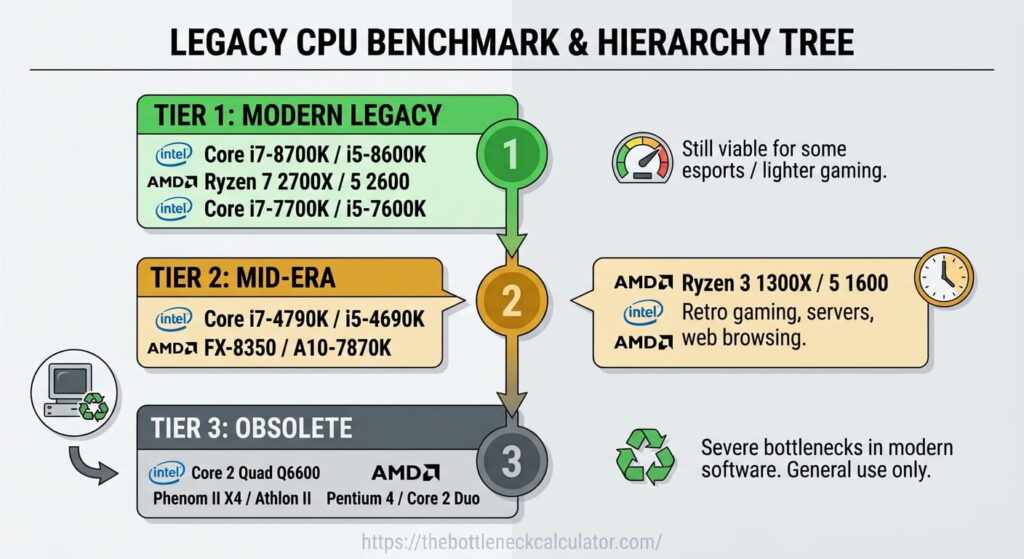
Legacy CPU Benchmark Hierarchy Overview
Understanding where an older processor sits in the performance hierarchy prevents you from overspending on an overpowered graphics card.
Performance Tiers Across Generations
- Pre-2018 Processors (Intel 4th–7th Gen, AMD FX Series): Limited to DDR3 or slow DDR4 memory. These suit basic office tasks, retro games, or light home servers. They heavily bottleneck modern graphics cards.
- 2018–2020 Processors (Ryzen 2000/3000, Intel 8th–10th Gen): Solid multi-core capability. They handle mid-range graphics cards well at 1080p resolution. If you are considering a budget AM4 upgrade, read our full analysis on the Ryzen 5 5600 + RTX 5060 bottleneck to see real-world frametime metrics.
- 2020–2022 Processors (Ryzen 5000, Intel 11th–12th Gen): Highly capable modern chips. Processors like the Ryzen 5 5600 or Core i5-12400F remain incredible value picks today.
Evaluating Bottleneck Factors on Older Processor Architectures
A bottleneck happens when one part limits the performance of another. In older systems, the processor is usually the bottleneck.
Quick Diagnostic Rule:
If your graphics card stays at 99% usage while playing games, your system is balanced. If your GPU usage drops below 80% while your processor sits near 100%, you have a heavy CPU bottleneck. Unsure if a slight performance gap will impact your games? Check our detailed guide on whether a 5% bottleneck is bad for gaming.
The PCIe Bus Bandwidth Trap
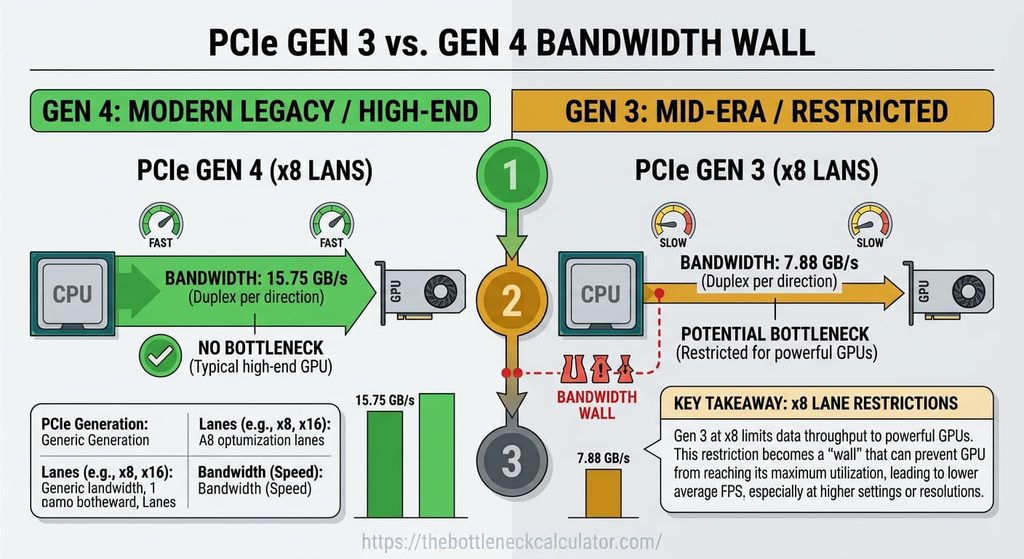
Modern budget graphics cards often use reduced PCIe lane counts (like x8 or x4 lanes). Placing a PCIe Gen 4 x8 graphics card onto a legacy PCIe Gen 3 motherboard cuts available bandwidth in half.
View: PCIe bus bandwidth standards
When your graphics card runs out of onboard VRAM, texture data spills onto system memory over the slow PCIe Gen 3 slot. This causes immediate frame drops and micro-stutters.
Practical PC Build Pairings for Legacy Processors
Pairing parts correctly ensures you get full value out of every rupee spent. Here are effective hardware combinations for popular older chips:
Legacy CPU Model | Recommended GPU Match | Target Resolution | Expected Real-World Performance |
AMD Ryzen 5 5600 | RTX 4060 / RX 6700 XT | 1080p / 1440p | High-refresh 1080p gaming with minimal bottleneck. |
Intel Core i5-12400F | RTX 4070 / RX 7800 XT | 1440p | Excellent balance for high graphics settings. |
AMD Ryzen 7 3700X | RTX 3060 Ti / RX 6600 XT | 1080p | Solid performance with minor limits in esports titles. |
Intel Core i7-8700K | GTX 1660 Super / RTX 3060 | 1080p | Reliable entry-level budget setup. |
Intel Core i7-4790K | RX 580 / GTX 1060 (Used) | 1080p Low | Repurposed budget setup for esports or retro games. |
For broader architectural expectations across next-gen graphics pipelines, consult our NVIDIA RTX 50-Series Bottleneck Guide.
Motherboard and Socket Compatibility Guide
You cannot install a legacy processor into just any motherboard. Physical socket matching and chipset support are mandatory.
Socket Types Explained
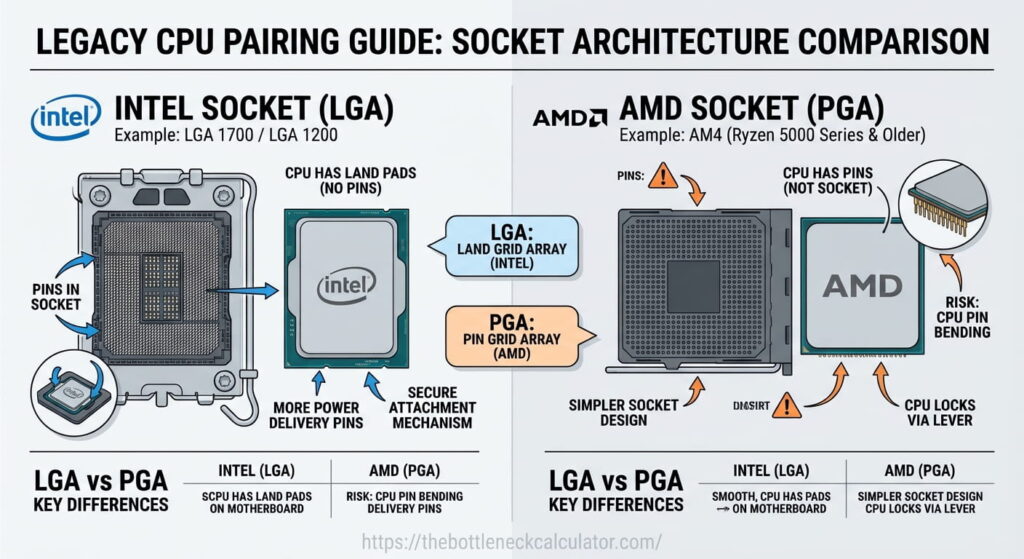
- LGA (Land Grid Array): Socket pins sit inside the motherboard socket. Used by Intel and modern AMD AM5 boards.
- PGA (Pin Grid Array): Pins sit directly on the processor underside. Used by older AMD sockets like AM4 and AM3.
Popular Legacy Sockets
- AMD Socket AM4: Supports processors from early Ryzen 1000 up to Ryzen 5000X3D chips across B450, B550, and X570 motherboards.
- Intel Socket LGA 1200: Supports 10th and 11th Gen Intel chips across B460, B560, and Z490 boards.
- Intel Socket LGA 1151: Split into two non-compatible revisions. Revision 1 supports 6th/7th Gen chips. Revision 2 supports 8th/9th Gen chips.
Updating Your BIOS
When installing a newer processor into an older motherboard of the same socket, always update the BIOS first. Boot up with your old processor, flash the latest BIOS version, and then swap in the new chip.
Evaluating Component Ecosystem Compatibility
When building around an older chip, verify that neighboring components match properly.
- System RAM: Check whether your processor uses DDR3 or DDR4 memory. Match memory speed to the highest supported frequency of the processor memory controller.
- Power Supply Unit: Older chips draw more power and generate higher heat than modern efficient parts. Make sure your power supply provides sufficient wattage and clean connectors.
- Cooling Needs: Review the Thermal Design Power (TDP) rating. High-tier older chips require sturdy aftermarket air coolers to avoid thermal throttling.
Buying Used Processors: Market Inspection & Scrap Value
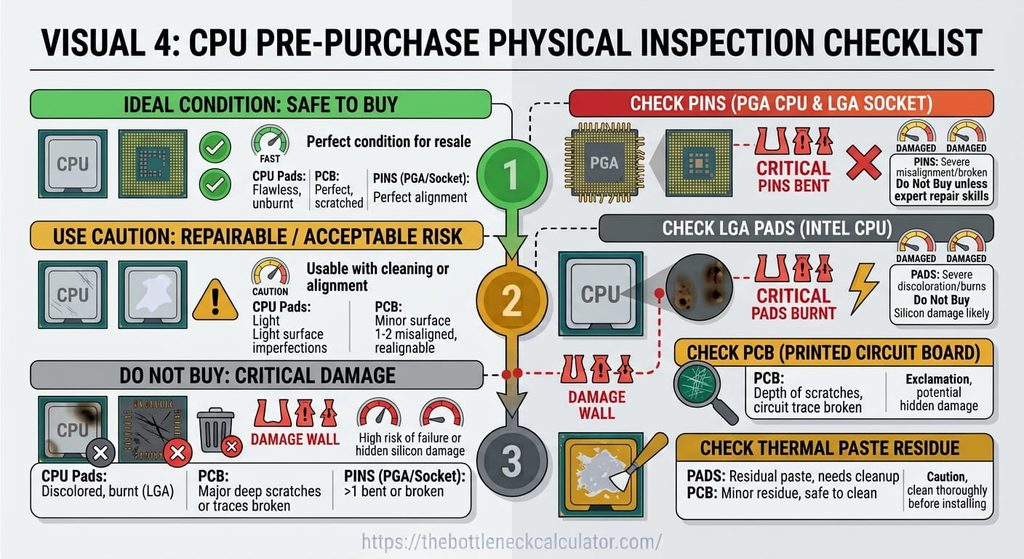
The secondhand market for processors is huge. Buying used stretches your budget, but physical inspection matters.
Pros and Cons of Used Processors
- Pros: Unbeatable price-to-performance ratio for tight budgets. Processors rarely fail unless physically abused or heavily overvolted.
- Cons: No warranty protection. Lack of native PCIe 4.0 or Windows 11 support on old models. Risk of bent pins on PGA chips.
Industrial Value and Scrap
Very old chips (like Intel Pentium or AMD Athlon) hold value purely for gold recovery and refining. Scrap processors are traded by ceramic density and pin gold-plating purity within the industrial e-waste sector.
Actionable Checklist for Upgrading a Legacy System
- Set Clear Goals: Decide if the build is for gaming, office work, or network storage.
- Verify Socket and BIOS: Check motherboard model, socket layout, and available BIOS updates.
- Balance Your GPU Pairing: Match graphics card power to processor capability to prevent heavy stutters.
- Inspect Physical Pins: Check PGA processors for bent pins and LGA sockets for damaged contact pads.