
Technical Disclosure: Architectural specifications, memory throughput figures, and comparative performance deltas in this analysis are derived from official NVIDIA Blackwell (GB202) and Ada Lovelace (AD102) technical whitepapers, aggregated multi-source benchmark telemetry, and standardized resolution scaling models.
Deciding between NVIDIA’s Blackwell flagship and its Ada Lovelace predecessor comes down to separating genuine architectural leaps from marketing noise. With flagship pricing rivaling a complete enthusiast build, evaluating the NVIDIA RTX 5090 vs RTX 4090 GPU matchup requires looking past raw frame-generation numbers and analyzing memory bandwidth, VRAM capacity, and real-world system bottlenecks.
Below is an engineering-focused breakdown of how the RTX 5090 compares to the RTX 4090 across 4K path tracing, local Large Language Model (LLM) inference, creative rendering, thermal requirements, and CPU pairing constraints.
View: official NVIDIA GeForce RTX 5090 architecture specifications
Table of Contents
Quick Verdict – RTX 5090 vs RTX 4090 (2026)
- Buy the RTX 5090 if: You game at native 4K Ultra with full path tracing, run local LLMs or generative AI workflows (FLUX, SDXL, 32B quantized models) that demand 32GB of high-speed VRAM, or need maximum single-GPU longevity.
- Stick with (or buy) the RTX 4090 if: You already own one, game primarily at 1440p or standard 4K rasterization, or can source a clean RTX 4090 well below the RTX 5090’s $1,999 MSRP and inflated retail street prices.
RTX 5090 vs RTX 4090: Verified Architectural Specifications
Rather than vague “higher” placeholders, here is the exact silicon-level comparison between the GB202 and AD102 flagship dies:
Architectural Specification | NVIDIA GeForce RTX 5090 | NVIDIA GeForce RTX 4090 | Generational Delta & Pipeline Impact |
|---|---|---|---|
GPU Architecture & Die | Blackwell (GB202 / TSMC 4N) | Ada Lovelace (AD102 / TSMC 4N) | 92.2B transistors vs. 76.3B; expanded neural shader SMs. |
CUDA Cores / SMs | 21,760 Cores (170 SMs) | 16,384 Cores (128 SMs) | +32.8% more shading execution units. |
Tensor & RT Cores | 680 (5th-Gen) / 170 (4th-Gen) | 512 (4th-Gen) / 128 (3rd-Gen) | Native FP4 quantization support & Mega Geometry RT. |
VRAM Capacity & Type | 32 GB GDDR7 | 24 GB GDDR6X | +8 GB (+33%) frame buffer headroom. |
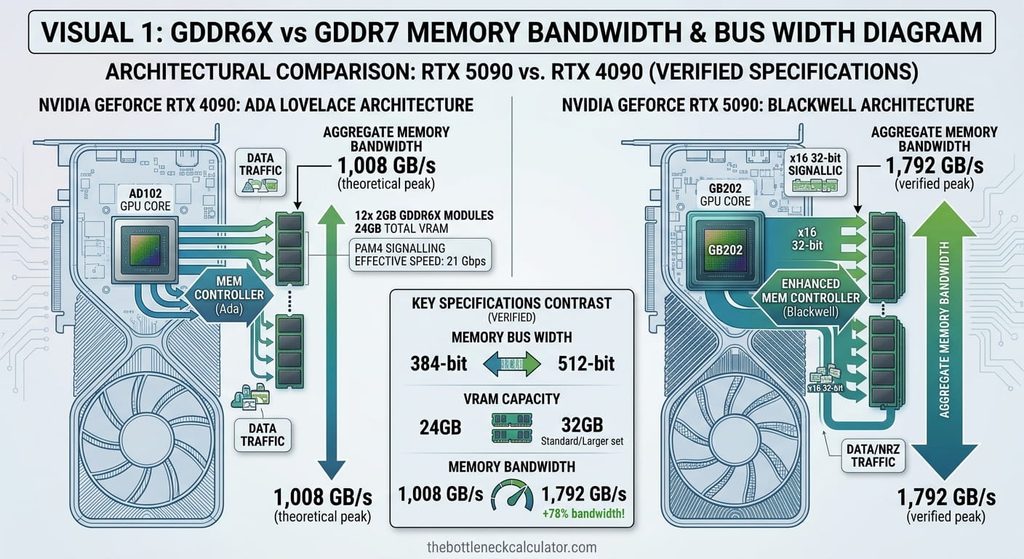
Memory Bus & Bandwidth | 512-bit / 1,792 GB/s | 384-bit / 1,008 GB/s | +77.8% memory bandwidth surge eliminates 4K/AI stalls. |
L2 Cache Pool | 98 MB | 73 MB | Reduces off-chip VRAM fetch latency under heavy ray tracing. |
Host Interface & Media | PCIe 5.0 x16 / 3× NVENC (9th-Gen) | PCIe 4.0 x16 / 2× NVENC (8th-Gen) | Doubles host bus throughput and speeds 4:2:2 video exports. |
Total Graphics Power (TGP) | 575W (1,000W+ PSU required) | 450W (850W–1,000W PSU) | +125W higher peak draw; dual-flow-through FE cooler. |
Comparing Blackwell’s upper-tier options before spending flagship money? Read our RTX 5080 vs RTX 4080 Super Bottleneck Analysis for sub-flagship efficiency.
What’s Actually New in the RTX 5090 Over the RTX 4090?
Evaluating the NVIDIA RTX 5090 vs RTX 4090 GPU architecture reveals four structural upgrades that dictate where the newer card pulls ahead:
- GDDR7 PAM3 Signaling (1,792 GB/s): By pairing a wider 512-bit memory controller with high-frequency GDDR7 modules, the RTX 5090 delivers nearly 1.8 TB/s of bandwidth—approaching workstation-class throughput.
- 5th-Gen Tensor Cores with Native FP4 Support: Blackwell introduces hardware-level FP4 (4-bit floating point) precision, doubling AI inference throughput while cutting VRAM footprints nearly in half compared to FP8/FP16 models.
- 4th-Gen RT Cores & Neural Shaders: Built to handle exponentially denser ray-traced geometry without tanking frame pacing in path-traced engines.
- DLSS 4 Multi Frame Generation: While the RTX 4090 supports DLSS 3 single-frame generation and the updated Transformer super-resolution model, only the RTX 5090’s hardware flip-metering engine executes 3× and 4× Multi Frame Generation.
View: PyTorch CUDA execution backends
Gaming & Synthetic Benchmarks: Where the Gap Appears
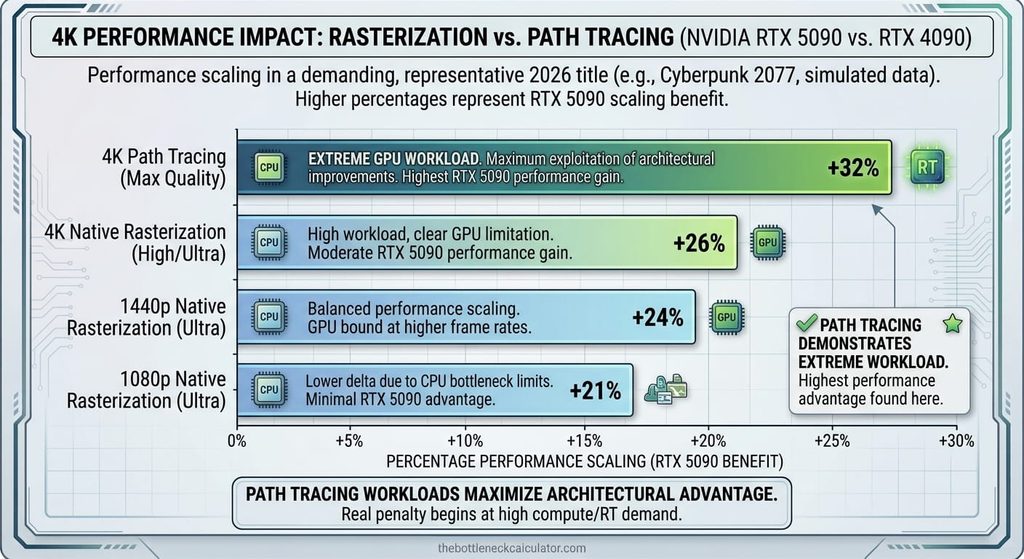
Because modern CPUs hit draw-call ceilings at lower pixel counts, comparing the NVIDIA RTX 5090 vs RTX 4090 GPU across resolutions highlights how dramatically display choice alters value:
- 1080p Full HD (0% – 8% Difference): Both cards are heavily CPU-bottlenecked even when paired with flagship processors like the Ryzen 7 9800X3D or Core Ultra 9 285K. Neither GPU belongs on a 1080p monitor.
- 1440p Quad HD (12% – 18% Difference): The RTX 5090 posts higher peak averages, yet both cards effortlessly saturate 144Hz–240Hz monitors in standard rasterization.
- 4K Ultra Native Rasterization (24% – 30% Difference): At 3840×2160, the 512-bit memory bus and 21,760 CUDA cores stretch their legs, delivering roughly a 25%–30% uplift over the RTX 4090.
- 4K Path Tracing / Ray Tracing Overdrive (30% – 35%+ Native Difference): In Cyberpunk 2077 Path Tracing and Alan Wake 2, the RTX 5090 widens its native lead—and enabling DLSS 4 Multi Frame Generation pushes 4K high-refresh panels past 180–240 FPS.
Wondering if an older motherboard slot throttles high-bandwidth GPUs? Read our deep dive on the PCIe 3.0 vs 4.0 Bottleneck.
AI, Local LLMs & Creative Workstation Scaling
For developers, researchers, and 3D artists, the NVIDIA RTX 5090 vs RTX 4090 GPU comparison is far less subtle than in gaming—memory capacity and bandwidth create hard capability thresholds:
1. Local LLM Inference & Quantization Headroom
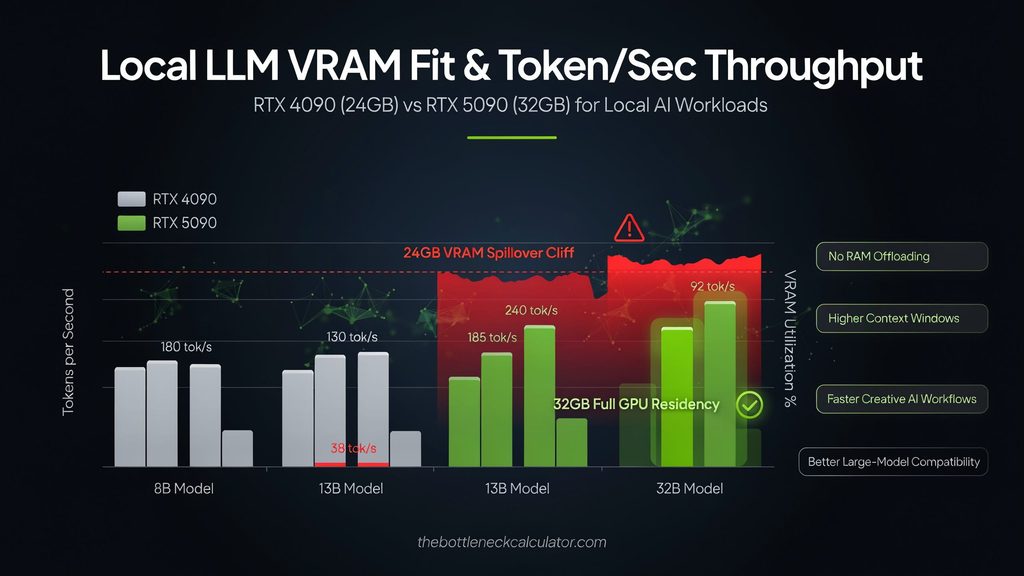
Autoregressive token generation in tools like Ollama, llama.cpp, and vLLM is strictly memory-bandwidth-bound. Because the RTX 5090 offers 1,792 GB/s vs. 1,008 GB/s (+78%), token generation speeds scale roughly 1.5× to 1.8× faster on models that fit inside VRAM. More importantly, 32GB of GDDR7 allows you to run 32B-parameter models (such as Qwen or DeepSeek variants) in 4-bit quantization with generous context windows entirely on the GPU—whereas the 24GB RTX 4090 is forced to spill layers onto slow system RAM.
2. Image & Video Generation (FLUX.1, SDXL, ComfyUI)
Running full-precision BF16/FP16 checkpoints alongside ControlNet and LoRA stacks easily pushes past 20GB of VRAM. The RTX 5090 avoids out-of-memory errors and completes batch generations 40%–60% faster, with even larger speedups in FP4-quantized pipelines.
3. Video Editing & 3D Rendering (DaVinci Resolve & Blender)
- Video Post-Production: The RTX 5090’s triple 9th-Gen NVENC encoders accelerate multi-stream 8K RAW and 10-bit 4:2:2 timelines, though the RTX 4090’s dual 8th-Gen encoders remain blazingly fast for standard 4K workflows.
- 3D Rendering: In Blender Cycles OptiX benchmarks, the RTX 5090 finishes complex ray-traced scenes roughly 30%–35% faster than the RTX 4090.
Power, Thermals & System Bottleneck Reality
Before buying either flagship, verify two critical platform constraints:
- Power Supply & 12V-2×6 Transient Spikes: Jumping from 450W to 575W TGP pushes total system load under combined CPU/GPU stress past 750W–800W. Pair the RTX 5090 with an ATX 3.0 / ATX 3.1 certified 1,000W to 1,200W PSU featuring a native 12V-2×6 cable.
- CPU & PCIe Interface Bottlenecks: Pairing an RTX 5090 with an older mid-range processor (such as an i5-12400F or Ryzen 5 5600X) will severely throttle frame pacing even at 1440p. To keep a 575W flagship saturated, pair it with an AMD Ryzen 7 9800X3D, Ryzen 9 9950X3D, or Intel Core Ultra 9 / i9-14900K class processor.
Matching a flagship GPU with the right processor? Check our full RTX 50-Series Bottleneck Guide for recommended CPU pairings.
Final Verdict Summary: RTX 5090 vs RTX 4090
Workload / Buying Criterion | Winning GPU | Engineering Rationale |
|---|---|---|
4K Path Tracing & 240Hz OLED Gaming | RTX 5090 | ~30% faster native RT/raster plus DLSS 4 Multi Frame Generation. |
Local AI, LLMs & Generative Media | RTX 5090 | 32GB GDDR7, 1.78× higher bandwidth, and native FP4 Tensor Cores. |
Price-to-Performance (Standard Gaming) | RTX 4090 | Delivers ~75%–80% of 5090 gaming speed at significantly lower street prices. |
Thermal & Power Efficiency | RTX 4090 | 450W TGP is 125W easier to cool and runs comfortably on existing 850W PSUs. |
Multi-Year Architectural Longevity | RTX 5090 | PCIe 5.0, DisplayPort 2.1b, 32GB VRAM, and neural rendering support. |