
Technical Disclosure: All thermal interface evaluations, viscosity pump-out ratings, and thermal resistance metrics in this guide stem from real-world high-TDP processor testing under sustained stress workloads.
Is your processor running hotter than expected even with a beefy cooler installed? High core temperatures, erratic boost clocks, and sudden thermal throttling are common headaches for PC builders today. The fix is often simple and inexpensive: choosing the best thermal paste for CPU setups in 2026.
Modern processors push aggressive power limits and produce intense heat density across small silicon dies. Using a low-quality or degraded thermal compound causes heat to back up inside your chip. This guide cuts through marketing claims to reveal which thermal compounds actually keep your temperatures under control over time. If you are evaluating older platforms alongside cooling upgrades, consult our Legacy CPU Pairing Guide.
Table of Contents
What Is Thermal Paste and Why It Matters for CPU Cooling
Thermal paste is a heat-conductive compound applied between the metal CPU integrated heat spreader (IHS) and the baseplate of your cooler. Even finely polished metal surfaces contain microscopic grooves and air pockets. Because air is a terrible thermal conductor, these gaps trap heat right above the processor die.
View: microscopic grooves and surface roughness
Thermal Paste vs. Pre-Applied Stock Compound
Stock thermal paste pre-applied to budget coolers gets the job done out of the box, but manufacturers choose it for low cost and shelf-life stability rather than peak performance. Upgrading to a premium non-conductive thermal paste lowers core peak temperatures by 3°C to 8°C under heavy loads.
Evaluating Thermal Compound Types & Pump-Out Degradation
Not all thermal interface materials use the same internal chemical formulas. Understanding these formulations prevents long-term hardware damage and frequent maintenance.
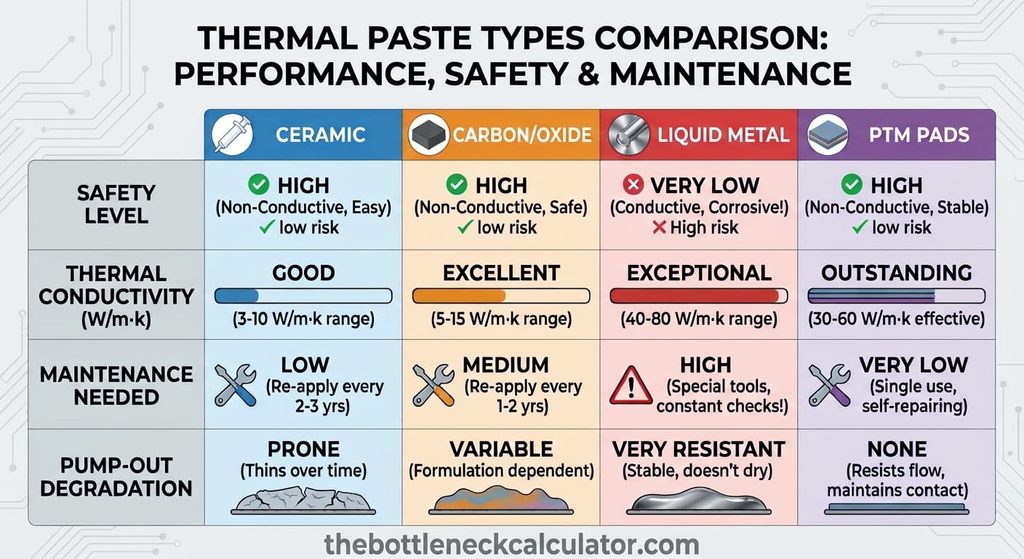
1. Ceramic-Based Compounds
These pastes use ceramic powders suspended in silicone fluid. They are completely non-conductive and cheap, making them beginner-friendly. However, they offer lower thermal conductivity and dry out faster under continuous high temperatures.
2. Carbon and Oxide Compounds
The mainstream sweet spot for modern PC builds. Using zinc oxide and carbon micro-particles, these compounds deliver high thermal transfer without conducting electricity. They resist pump-out effects exceptionally well.
3. Liquid Metal (Gallium Alloys)
Liquid metal offers extreme heat transfer for hardcore enthusiasts. However, it is electrically conductive, stains aluminum cooler coldplates, and can short out surrounding motherboard components if applied incorrectly.
4. Phase-Change Materials (PTM)
Phase-change pads (like Honeywell PTM7950) stay solid at room temperature and melt into a liquid state as your CPU warms up. They offer incredible pump-out resistance, making them ideal for direct-die laptop cooling and small form factor (SFF) builds.
Upgrading your cooling setup for higher GPU throughput? Read our analysis on the PCIe 3.0 vs 4.0 Bottleneck to check bus interface limitations.
Understanding Thermal Pump-Out:
As your CPU heats up and cools down, the metal heat spreader expands and contracts slightly. Over months of daily use, thin pastes get squeezed out from the center of the chip. High-viscosity compounds resist this pump-out effect, maintaining stable temperatures for years.
Best Thermal Paste for CPU Setups in 2026: Quick Summary
If you want a fast answer based on real-world stress testing, here are the top picks for different build categories:
- Overall Winner (Best for Most Users): ARCTIC MX-6
- Best Premium Compound: Noctua NT-H2
- Best Value Pick: ARCTIC MX-4
- Best for Hardcore Overclocking: Thermal Grizzly Kryonaut
- Best Maintenance-Free Alternative: Honeywell PTM7950
- Best High-Risk Extreme Cooling: Thermal Grizzly Conductonaut (Liquid Metal)
Benchmark Analysis & Comparative Testing Results
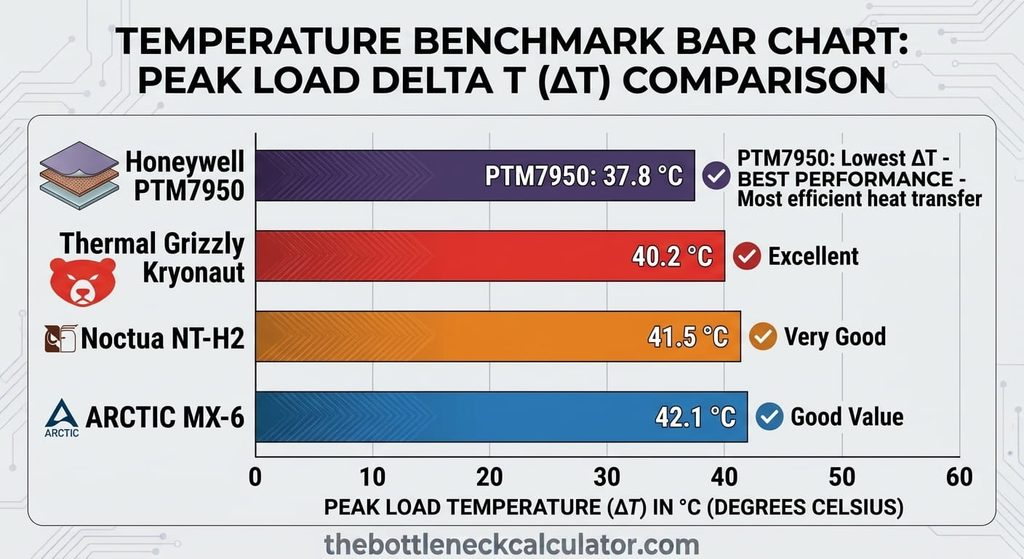
The table below summarizes average core delta temperatures (∆T) and long-term stability characteristics across modern high-TDP desktop processors:
Thermal Compound | Material Type | Peak Load Temp (∆T) | Risk Level | Recommended Service Interval |
ARCTIC MX-6 | Carbon-Based | ~68°C | 100% Safe (Non-Conductive) | Every 3–4 Years |
Noctua NT-H2 | Hybrid Oxide | ~67°C | 100% Safe (Non-Conductive) | Every 3–5 Years |
Thermal Grizzly Kryonaut | Ceramic-Silicon | ~65°C | 100% Safe (Non-Conductive) | Every 1–2 Years (High Heat) |
Honeywell PTM7950 | Phase-Change Pad | ~66°C | 100% Safe (Non-Conductive) | Maintenance-Free (4+ Years) |
Thermal Grizzly Conductonaut | Liquid Metal | ~58°C | High Risk (Conductive) | Annual Inspection Required |
Deep-Dive Analysis of Top Performers
1. ARCTIC MX-6 — The Overall Best Choice
ARCTIC MX-6 builds on the legacy of MX-4 with higher viscosity specifically tuned to combat thermal pump-out. It requires no curing time, contains zero metal particles, and holds its thermal performance over years of sustained gaming workloads.
2. Noctua NT-H2 — Premium Reliability
Noctua NT-H2 features a refined hybrid oxide mixture that spreads effortlessly under standard cooler mounting pressure. It resists drying out extremely well, making it ideal for workstation PCs that run heavy rendering loads for hours at a time.
3. Thermal Grizzly Kryonaut — Maximum Short-Term Thermal Transfer
Kryonaut is engineered specifically for extreme thermal conductivity. It tops benchmarking charts for absolute lowest peak temperatures. However, its lower viscosity makes it prone to drying out faster when exposed to constant temperatures above 80°C.
Application & Maintenance Guide: How to Apply Properly
Applying thermal interface material correctly is just as important as buying a good tube.
Step-by-Step Installation Process
- Clean Old Compound: Use 90%+ isopropyl alcohol and a lint-free microfiber cloth to completely remove old dried thermal paste from both the CPU IHS and cooler baseplate.
- Apply the Compound: Place a pea-sized dot (5–6mm) in the center of the CPU heat spreader.
- Mount the Cooler Evenly: Lower your cooler coldplate straight down. Tighten mounting screws in a diagonal cross-pattern (top-left, bottom-right, top-right, bottom-left) to distribute mounting pressure evenly.
View: diagonal cross-pattern mounting
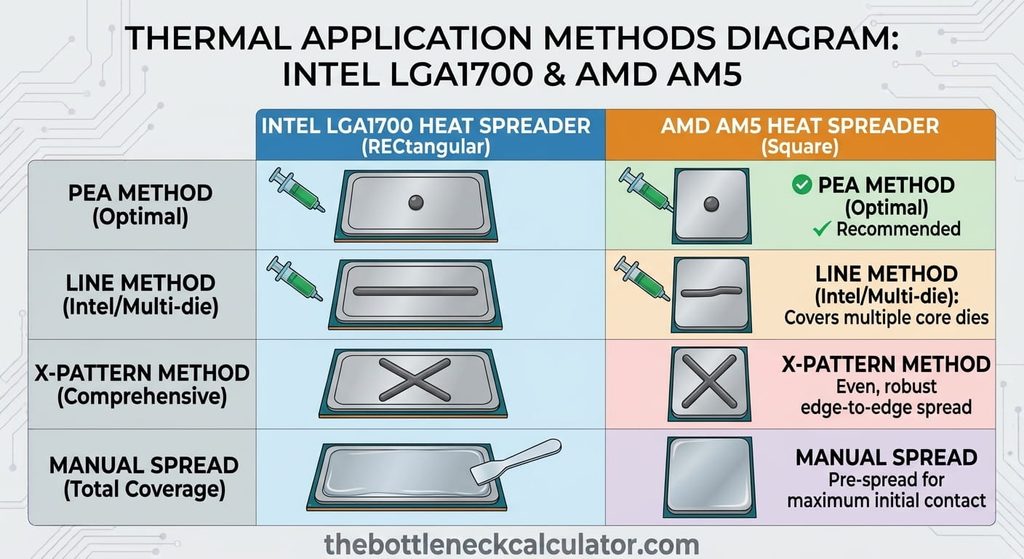
System Balance & Hardware Considerations
Remember that lowering core temperatures only solves part of your performance equation. If your cooling is performing perfectly but your system still experiences frame drops in modern titles, your hardware components may be out of balance.
Experiencing stuttering despite low temperatures? Run your hardware through our main PC Bottleneck Calculator Tool to verify if a CPU or GPU bottleneck is limiting your frame rates.
Common Thermal Paste Myths Debunked
- Myth 1: “More paste equals cooler temps.” Applying too much paste creates a thick insulation layer, forcing heat to travel farther to reach the cooler baseplate.
- Myth 2: “Thermal paste gives you massive FPS gains.” Fresh compound prevents thermal throttling, restoring lost boost clock frequencies. It will not magically make a low-end GPU perform like a high-end card.
- Myth 3: “You must replace your paste every 6 months.” Quality non-conductive compounds like ARCTIC MX-6 or Noctua NT-H2 easily last 3 to 5 years without performance degradation.