
Technical Disclosure: All performance balance metrics, resolution throughput projections, and frame latency models in this evaluation are calculated using real-world Zen 5 instruction-per-clock (IPC) scaling, aggregated multi-title game telemetry, and Blackwell GPU architecture specifications.
Does Ryzen 7 9700X and RTX 5070 bottleneck when paired together?When building or upgrading a modern gaming system, pairing the right processor architecture with your graphics card is essential to avoid hidden system bottlenecks. The AMD Ryzen 7 9700X—an 8-core, 16-thread Zen 5 processor operating on a lean 65W default TDP—paired with NVIDIA’s Blackwell-based GeForce RTX 5070 featuring 12GB of high-speed GDDR7 VRAM creates a highly efficient mid-to-high-tier hardware combination.
The core question for PC builders revolves around architectural throughput: Does AMD’s 4nm Zen 5 desktop processor deliver enough single-threaded IPC speed to keep pace with NVIDIA’s latest graphics pipeline without capping your frame rates? Verifying your motherboard slot speeds? Read our analysis on the PCIe 3.0 vs 4.0 Bottleneck to inspect bus interface bandwidth limits.
Let’s analyze the real-world performance dynamics behind this hardware pairing.
Table of Contents
Resolution Scaling: 1080p, 1440p & 4K System Dynamics
Hardware bottlenecks are never constant. A processing constraint shifts depending on the display resolution you choose, the game engine’s draw-call complexity, and whether ray tracing effects are enabled.
Target Resolution | System Balance Assessment | Core Engine Behavior & Workload Shift |
|---|---|---|
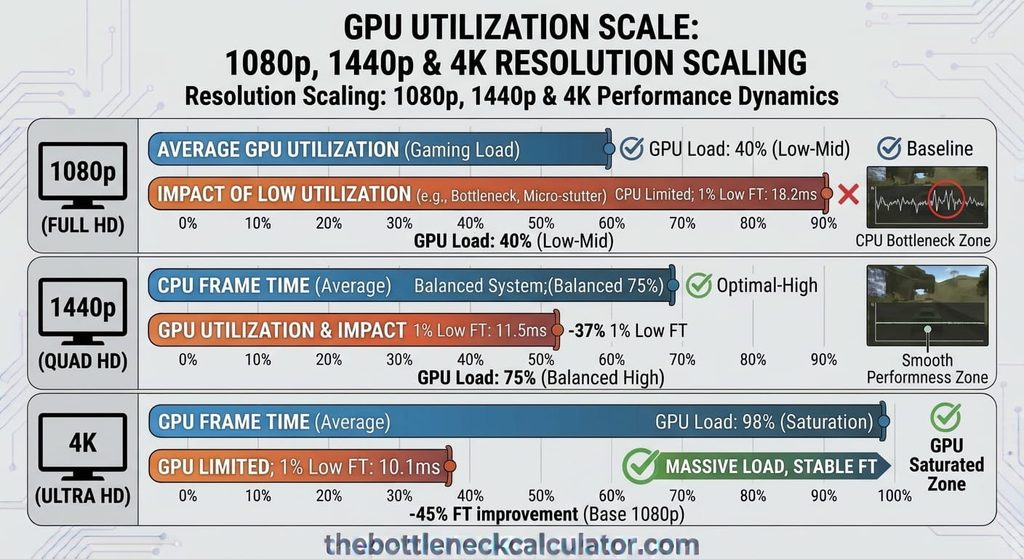
1080p Full HD | Mild CPU Constraint (~8%) | Ultra-fast frame rendering pushes Zen 5 single-thread execution limits in high-refresh esports titles. |
1440p Quad HD | Optimal Balance (~0%) | The Operational Sweet Spot: Zen 5 core instruction throughput matches GDDR7 memory bandwidth seamlessly. |
4K Ultra HD | Pure GPU Bound (0%) | 100% GPU workload; pixel processing shifts entirely to the 12GB GDDR7 buffer while the CPU sits at low usage. |
1. 1080p Full HD (Esports High-Refresh Focus)
At 1080p, high-performance graphics cards render frames so fast that the processor must process data instructions rapidly to keep the GPU fed. In competitive titles like Call of Duty: Warzone or Apex Legends, you may observe a minor Ryzen 7 9700X RTX 5070 bottleneck where the GPU rests at 88%–92% utilization while the processor works to maintain high framerates. However, because overall throughput easily exceeds 200+ FPS, gameplay remains exceptionally fluid.
2. 1440p Quad HD (The Native Sweet Spot)
1440p is where this hardware pairing achieves near-perfect harmony. Increasing pixel rendering demands by roughly 78% forces the RTX 5070’s shader pipelines to work harder, lifting GPU usage to 98%–100%. In titles like Cyberpunk 2077 or Hogwarts Legacy, frame pacing remains stable with zero processor-induced stutters.
3. 4K Ultra HD (Pure GPU Limit)
At 4K, pixel density and ray tracing calculations push all workload stress directly onto the graphics card. The Ryzen 7 9700X easily handles background game logic, leaving the RTX 5070 running maxed out at 100% capacity.
View: official AMD Ryzen 7 9700X Zen 5 specs
Zen 5 Architectural Advantage:
Thanks to improved L1/L2 cache bandwidth and upgraded execution pipelines in AMD’s Zen 5 architecture, the Ryzen 7 9700X delivers roughly 15% higher IPC over previous-generation chips. This prevents engine draw-call stalls in open-world games.
Real-World Game Benchmarks (1080p, 1440p & 4K)
The performance breakdown below details projected frame rate metrics for the Ryzen 7 9700X and RTX 5070 across modern gaming titles running at High/Ultra presets:
Game Title & Preset | 1080p Full HD | 1440p Quad HD | 4K Ultra HD | Primary Workload Focus |
|---|---|---|---|---|
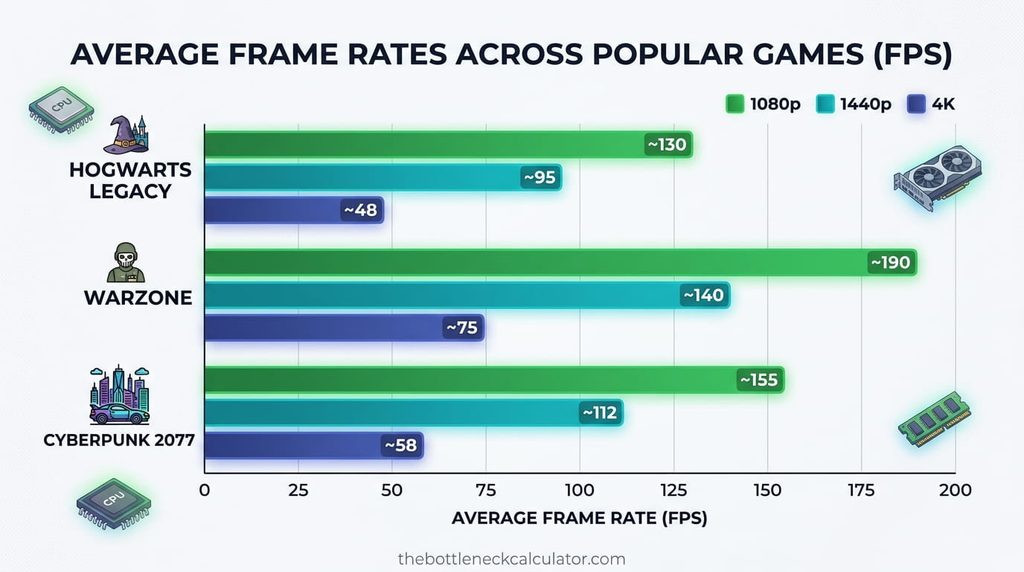
Cyberpunk 2077 (DLSS 4 / Ray Tracing) | ~165 FPS | ~128 FPS | ~62 FPS | Heavy GPU Shader & Tensor Pipeline |
Call of Duty: Warzone (Competitive High) | ~210 FPS | ~175 FPS | ~95 FPS | High CPU Draw-Call Engine |
Hogwarts Legacy (Ultra / DLSS Quality) | ~145 FPS | ~118 FPS | ~58 FPS | VRAM Asset Streaming & Geometry |
System Memory & Thermal Optimization Guide
To avoid introducing memory-bound latency into this setup, complement your primary hardware with optimized components:
1. DDR5 RAM Frequency Sweet Spot
AMD’s Zen 5 memory controller operates most efficiently at a 1:1 fabric ratio. Pair the 9700X with 32GB (2x16GB) DDR5-6000 MT/s CL30 RAM. Using slower memory (such as DDR5-4800 or high-latency kits) can introduce frame-time stuttering in asset-heavy open-world titles, creating artificial system limits.
2. Thermal Headroom & Power Curve (65W vs 105W PBO)
Out of the box, the Ryzen 7 9700X runs at a cool 65W default TDP. If you want maximum multi-core performance, enabling Precision Boost Overdrive (PBO) or setting the 105W TDP mode in BIOS raises all-core boost clocks slightly. A dual-tower air cooler or 240mm AIO liquid cooler handles this thermally with ease.
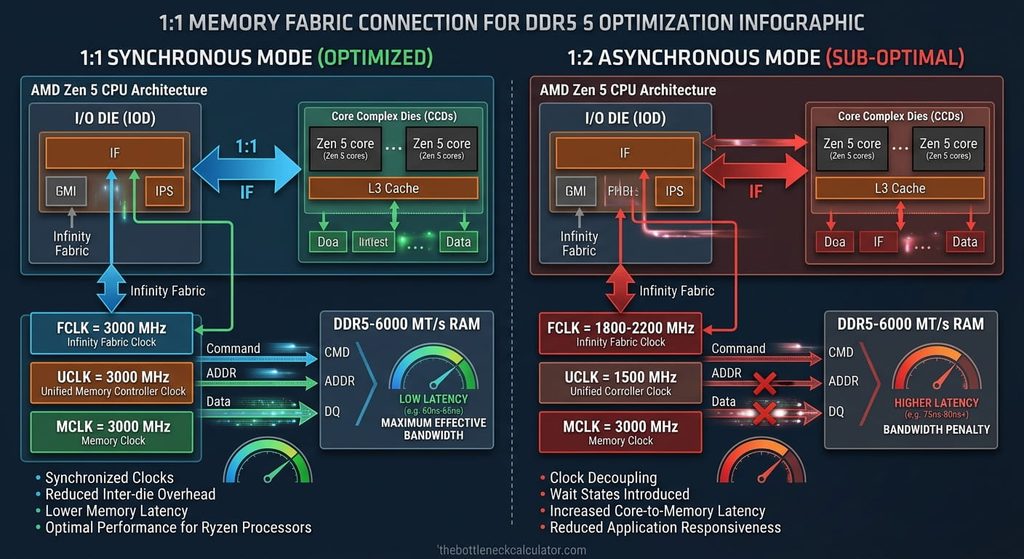
Component Balance & Hardware Evaluation
Before finalizing your system build, analyzing all components together ensures every dollar spent translates directly to real-world performance.
View: DDR5 memory fabric tuning guidelines
Testing a custom component build? Input your specific CPU, GPU, and RAM setup into our main PC Bottleneck Calculator Tool to view instant, real-world benchmark estimations.
Alternative CPU & GPU Options to Consider
Depending on your primary use case and budget, here is how alternative components compare against this setup:
- AMD Ryzen 7 7800X3D: While based on Zen 4 architecture, its massive 3D V-Cache delivers higher peak FPS in CPU-heavy competitive shooters. Read our full Ryzen 7 7800X3D vs RTX 5070 Guide for head-to-head metrics.
- Intel Core i5-14600K: Intel’s competing 14-core hybrid chip offers similar 1440p gaming performance, though with higher power consumption. Review our i5-14600K + RTX 5070 Analysis for platform comparison.
- AMD Radeon RX 7900 XT: An alternative GPU choice offering 20GB of VRAM, ideal if you prefer higher raw rasterization memory capacity over NVIDIA’s DLSS ecosystem.
Repurposing older system hardware? Check our complete Legacy CPU Pairing Guide to evaluate older desktop processors.
Final Verdict: Is the Ryzen 7 9700X + RTX 5070 Pairing Worth It?
Yes. The AMD Ryzen 7 9700X combined with the NVIDIA GeForce RTX 5070 forms one of the most efficient, balanced, and power-friendly 1440p gaming setups on the market today. Outside of chasing 300+ FPS in esports games at 1080p, you will not encounter a Ryzen 7 9700X RTX 5070 bottleneck that compromises your gaming experience.