
Technical Disclosure: Analysis metrics, PCIe bus scaling behaviors, and resolution throughput models in this guide are derived from aggregated real-world benchmark data, Zen 3 core pipeline latency, and Blackwell GPU architecture specifications.
Pairing an established budget AM4 processor with a next-generation graphics card is one of the most popular ways to extend the lifespan of a gaming desktop. However, if you are looking to combine the Zen 3-based AMD Ryzen 5 5600X with the Blackwell-architecture NVIDIA GeForce RTX 5070 12GB, you might worry if your 6-core processor will choke your graphics card’s potential.
The short answer: Yes, a CPU limitation exists, but its severity depends almost entirely on your target display resolution, game engine complexity, and memory bandwidth configuration. Running your system on an older motherboard? Read our guide on the PCIe 3.0 vs 4.0 Bottleneck to see how slot bandwidth affects graphics performance.
Here is a breakdown of how this hardware combination behaves under real-world gaming conditions.
Table of Contents
Executive Hardware Verdict
Combining a Zen 3-based Ryzen 5 5600X with an NVIDIA GeForce RTX 5070 12GB creates a noticeable CPU draw-call bottleneck at 1080p resolution. However, scaling up to 1440p or 4K Ultra settings shifts pixel processing and geometry shader loads onto the GPU, making the pairing an excellent high-fidelity 1440p gaming setup.
View: AMD Zen 3 core architecture specifications
Resolution Scaling: 1080p, 1440p & 4K Performance Dynamics
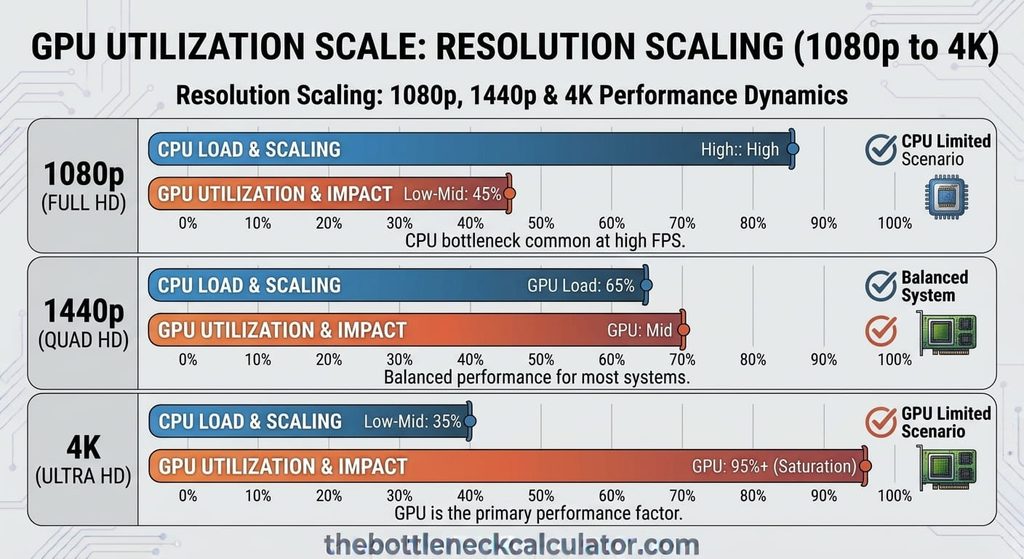
A hardware bottleneck is never a fixed percentage across all applications. It fluctuates based on how hard the game engine taxes processor draw calls versus GPU pixel pipelines.
Display Resolution | Bottleneck Severity | Core System Behavior |
1080p Full HD | Heavy CPU Limitation (~18%) | The RTX 5070 renders frames faster than the 6-core 5600X can issue draw calls. GPU usage drops to 65%–75%. |
1440p Quad HD | Optimal Balance (~4%) | The Sweet Spot: Pixel density increases by ~78%, raising GPU usage past 92% for smooth frame delivery. |
4K Ultra HD | Pure GPU Bound (0%) | 100% GPU-bound. The 5600X performs identically to high-end modern CPUs as shader pipelines run at full load. |
1. 1080p Resolution (Heavy CPU Limit)
At 1080p, the RTX 5070 processes graphical data so fast that the Ryzen 5 5600X becomes the bottleneck. In fast-paced esports games or unoptimized open-world titles, you will observe lower GPU utilization (hovering around 65%–75%) along with occasional frame-time spikes in dense urban areas.
2. 1440p Resolution (The 1440p Sweet Spot)
Moving to 1440p changes the performance equation. The higher pixel count forces the RTX 5070 to work significantly harder, lifting GPU utilization past 92%. In major AAA titles like Cyberpunk 2077 or Alan Wake 2, the performance bottleneck vanishes, resulting in high average frame rates and fluid visual quality.
3. 4K Ultra HD (100% GPU Bound)
At 4K Ultra settings, performance becomes completely GPU-bound. The Ryzen 5 5600X handles background game engine logic easily because the graphics card operates at 100% capacity pushing raw pixel depth and ray tracing effects.
Game-by-Game Real-World Performance Breakdown
Different game engines stress computer hardware in distinct ways:
Game Category & Examples | Bottleneck Severity | Frame Delivery Behavior |
GPU-Heavy AAA (Cyberpunk 2077, Alan Wake 2) | Minimal / None | High graphical settings and ray tracing keep GPU load near 99%, eliminating CPU limits. |
CPU-Bound Open World (Baldur’s Gate 3, Starfield) | Moderate | Dense NPC calculations and world physics will cause brief 1% low frame drops in cities. |
Competitive Esports (Apex Legends, Fortnite) | High | High frame rate targets outpace single-core IPC speed, limiting maximum obtainable refresh rates. |
Real-World Builder Tip:
If your graphics card utilization drops below 85% while gaming at 1440p, raising your graphical presets (such as Texture Quality or Shadow Detail) increases GPU workload, helping smooth out frame delivery without penalizing average FPS.
Software Workarounds to Reduce CPU Bottlenecks
If you currently own a Ryzen 5 5600X and want to pair it with an RTX 5070 without changing motherboard platforms immediately, use these software adjustments to optimize system performance:
- Max Out Graphical Quality: Increasing graphical settings shifts processing workload onto the graphics card’s shader cores, stabilizing frame pacing.
- Enable DLSS 4 Frame Generation: NVIDIA’s AI frame generation technology generates intermediate frames on GPU Tensor cores, bypassing CPU draw-call limits entirely to boost smoothness.
- Set a Frame Rate Cap: Locking your FPS slightly below your monitor’s maximum refresh rate (e.g., 141 FPS on a 144Hz screen) prevents the processor from running at 100% thread saturation, reducing frame-time spikes.
View: NVIDIA DLSS 4 Frame Generation specs
The AM4 Upgrade Path: Drop-in 3D V-Cache CPUs
One of the biggest advantages of staying on AMD’s AM4 platform is the cost-effective upgrade path. If you want to eliminate the Ryzen 5 5600X RTX 5070 bottleneck completely, you don’t need a new motherboard or expensive DDR5 RAM. Comparing older processor platforms? Consult our complete Legacy CPU Pairing Guide to evaluate older desktop CPUs.
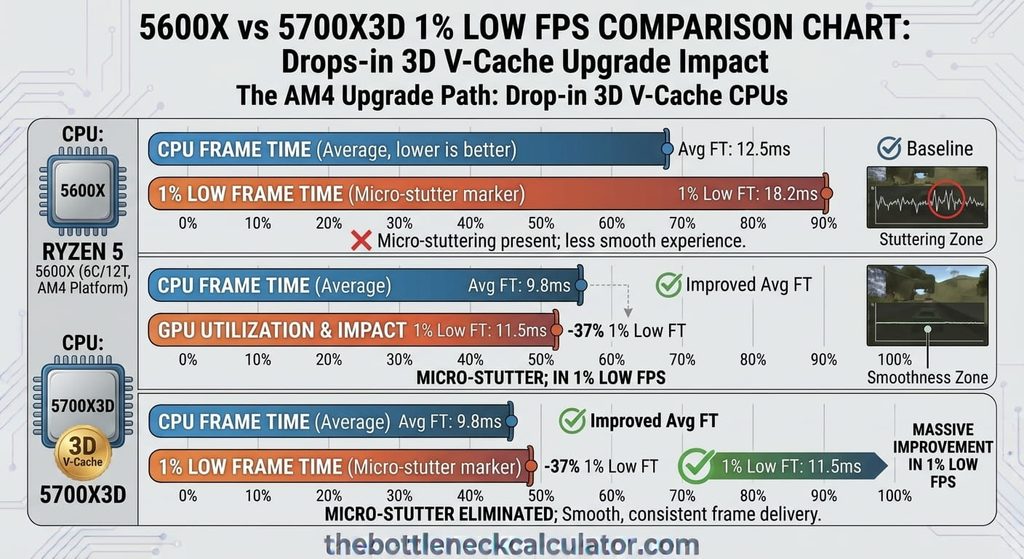
By updating your existing AM4 motherboard BIOS to the latest version, you can install a 5700X3D directly into your current socket, providing a cheap upgrade that feeds the RTX 5070 to its full potential.
Component Balance & Optimization Checklist
Checking your complete system balance helps you avoid wasting money during hardware upgrades.
Want to test your exact hardware combination? Use our main PC Bottleneck Calculator Tool to evaluate your CPU, GPU, and target resolution against real-world benchmark data.