
Technical Disclosure: Architectural specifications, IPC scaling ratios, and resolution workload models in this guide are derived from official Intel Alder Lake and NVIDIA Ampere hardware documentation, aggregated engine telemetry, and multi-source hardware throughput analysis.
Pairing an Intel Core i5-12400F with an NVIDIA GeForce RTX 3070 remains one of the most popular value-focused gaming builds on the market. Yet if you monitor your overlay during intense firefights or open-world traversal, you might wonder: is the i5-12400F bottlenecking your RTX 3070 in modern games?
The straightforward engineering answer is no—for 1440p and standard AAA gaming, this pairing is remarkably well-balanced. However, because a bottleneck is never a static number, shifting down to 1080p Low settings in competitive shooters or pushing ultra texture packs against the RTX 3070’s 8GB VRAM buffer changes which component hits its ceiling first. Want to see how our engine weights L3 cache and single-core IPC across resolutions? Read How We Calculate Bottleneck Results.
Below is a technical breakdown of how the Alder Lake 6-core architecture interacts with the Ampere GA104 silicon across resolutions, how to diagnose frame-time dips in 60 seconds, and the exact settings that keep both components running at peak efficiency.
View: official Intel Core i5-12400F specifications | View: NVIDIA GeForce RTX 3070 architecture specs
Table of Contents
Architectural Matchup: Intel i5-12400F vs. NVIDIA RTX 3070
To understand where hardware limitations appear, look at the underlying throughput capabilities of both components rather than generic percentage scores:
Architectural Specification | Intel Core i5-12400F | NVIDIA GeForce RTX 3070 | System Balance & Pipeline Impact |
|---|---|---|---|
Microarchitecture & Node | Alder Lake (Intel 7 / 10nm) | Ampere (GA104 / Samsung 8nm) | Strong single-thread IPC matched with 2nd-Gen RT cores. |
Core / Shader Topology | 6 Performance-Cores / 12 Threads | 5,888 CUDA Cores | Pure P-core layout avoids E-core thread-scheduling stutters. |
Boost Clock & Cache / VRAM | Up to 4.40 GHz / 18 MB L3 Cache | 1.73 GHz Boost / 8 GB GDDR6 | 18 MB L3 cache caps ultra-high 360Hz+ esports ceilings. |
Memory Bandwidth & Bus | Dual-Channel DDR4-3200 / DDR5-4800+ | 256-bit Bus (448 GB/s Bandwidth) | 8GB VRAM buffer becomes the primary limit at 1440p/4K Ultra. |
Thermal Design / Board Power | 65W Base / 117W Max Turbo | 220W Total Graphics Power | Runs cool and efficient on a quality 650W 80+ Gold PSU. |
Resolution Scaling: When Does the Bottleneck Shift?
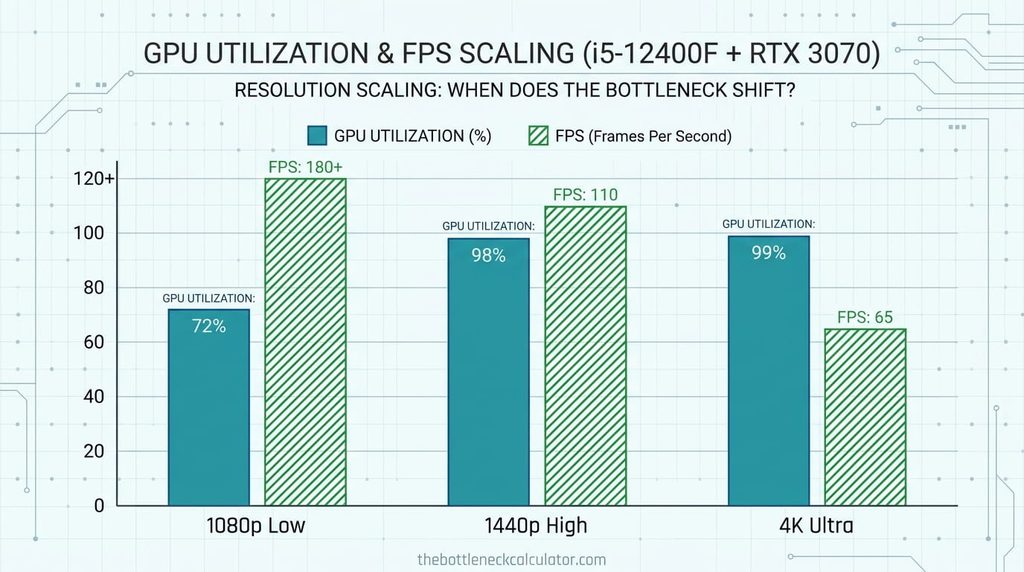
Evaluating whether is the i5-12400F bottlenecking your RTX 3070 depends almost entirely on your monitor’s pixel count and your target frame rate:
1. 1080p Competitive & High-Refresh Gaming (Mild CPU Ceiling)
At 1080p resolution—especially when dropping graphics presets to Low or Competitive in titles like Counter-Strike 2, Valorant, or Fortnite—the RTX 3070 renders frames so rapidly that the processor becomes the limiting factor.
- What happens: The i5-12400F’s 4.4 GHz boost clock and 18 MB L3 cache top out around 200–300+ FPS depending on the engine, leaving the RTX 3070 sitting at 60%–75% utilization.
- Real-world impact: Gameplay remains fast and responsive, though players with 240Hz or 360Hz monitors may notice slightly lower 1% low frame rates compared to an X3D or higher-clocked K-series processor.
2. 1440p Quad HD Gaming (The Ideal Sweet Spot)
Stepping up to 1440p increases the pixel load by 78% over 1080p, shifting the workload squarely onto the RTX 3070’s 5,888 CUDA cores.
- What happens: GPU utilization climbs cleanly into the 95%–99% saturation zone, while the i5-12400F comfortably feeds draw calls without maxing out all 12 threads.
- Real-world impact: Near-zero wasted hardware potential. Both parts operate in tight harmony.
3. 4K UHD & Ray-Traced AAA Titles (Strictly GPU & VRAM Limited)
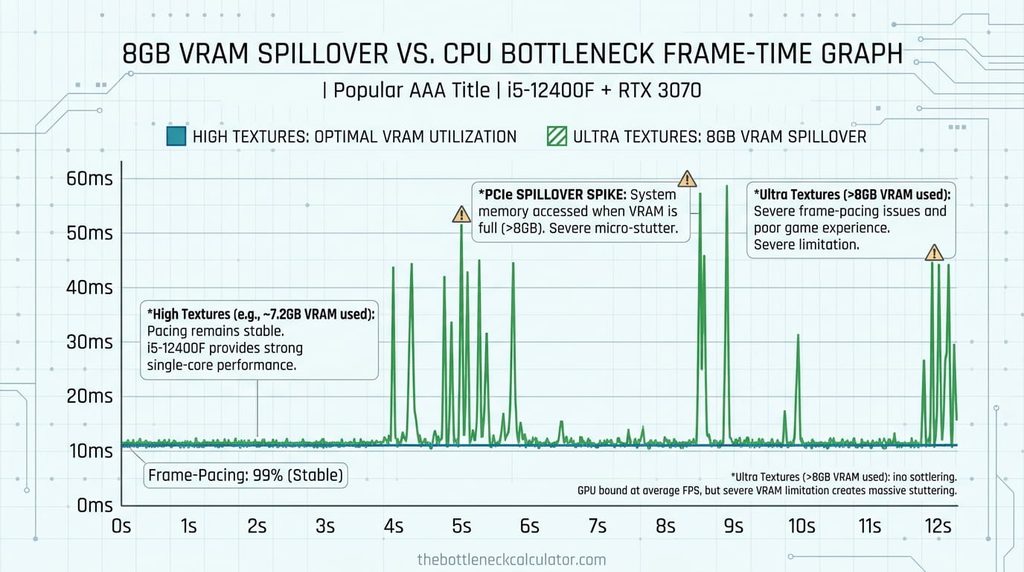
At 4K or in heavy ray-traced titles, the i5-12400F never bottlenecks the graphics card. Instead, the RTX 3070 hits its own rendering ceiling—and specifically its 8GB GDDR6 VRAM capacity—long before the processor runs out of headroom.
Checking how motherboard PCIe bandwidth affects VRAM spillover performance? Review our deep dive on the PCIe 3.0 vs 4.0 Bottleneck.
How to Test Your System Balance in 60 Seconds
Instead of guessing whether is the i5-12400F bottlenecking your RTX 3070 on your specific rig, verify real-time hardware behavior using an on-screen telemetry overlay (such as MSI Afterburner or NVIDIA FrameView):
- Inspect GPU Utilization Percentage: Launch your most-played game at your native resolution. If GPU usage stays locked between 95% and 99%, your RTX 3070 is delivering full performance and is not bottlenecked by the CPU.
- Watch Per-Core CPU Loads (Not Just Total %): A 6-core processor can be draw-call limited at 55% overall CPU usage if two primary game threads are pinned at 95%–100% while GPU usage drops below 80%.
- Run the Resolution Shift Check: Temporarily use NVIDIA DSR (Dynamic Super Resolution) to render the game at 1440p or 4K on a 1080p monitor. If your average frame rate barely drops while GPU usage jumps to 99%, your system was CPU-limited at 1080p.
Want instant baseline numbers for your build? Run your exact CPU, GPU, RAM speed, and monitor resolution through our PC Bottleneck Calculator Tool to compare 1080p, 1440p, and 4K balance ratios. Seeing a single-digit percentage gap on your test? Read our guide on Is a 5% Bottleneck Bad for Gaming? to see why small variances don’t hurt gameplay.
4 Proven Ways to Eliminate Micro-Stutters & Maximize FPS
If you notice frame-time dips on an i5-12400F + RTX 3070 rig, apply these targeted optimizations before spending money on new silicon:
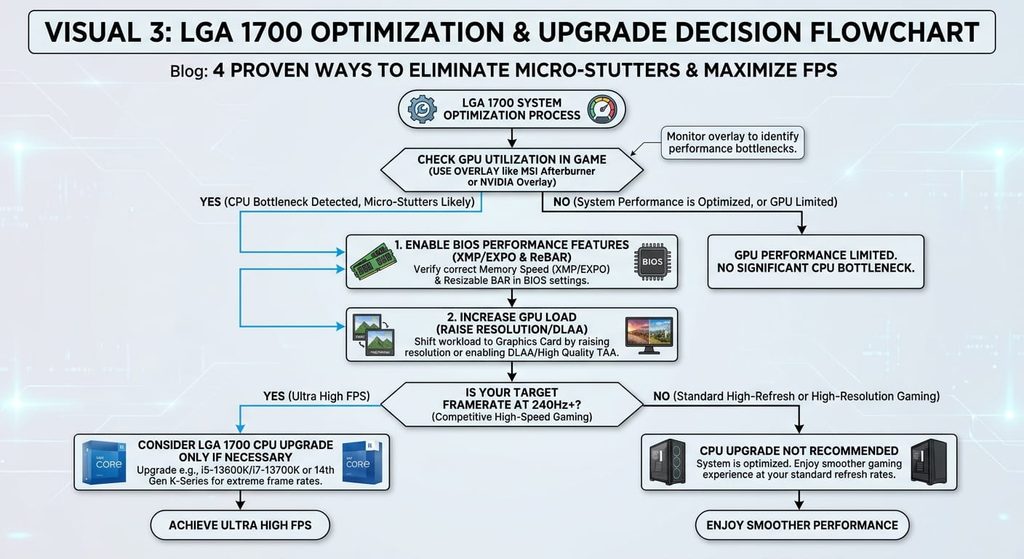
- Verify Dual-Channel RAM & XMP Profiles: Running a single stick of RAM or leaving DDR4-3200 / DDR5 memory at default base speeds starves the i5-12400F’s memory controller, slashing 1% low frame rates by up to 15%–20%. Ensure two sticks are installed in slots A2/B2 with XMP enabled in BIOS.
- Enable Resizable BAR (ReBAR): Both the Intel 600/700-series platform and the RTX 3070 support Resizable BAR, allowing the CPU to access the entire 8GB GPU frame buffer simultaneously rather than in 256MB chunks.
- Shift Load Back to the GPU: If you play at 1080p and see GPU usage hovering around 70%, turn on NVIDIA DLAA or raise shadow, ambient occlusion, and volumetric lighting settings. You get sharper visuals at virtually zero FPS cost.
- Cap Frame Rates Slightly Below Monitor Refresh: Using NVIDIA Reflex or an in-game frame cap (e.g., 162 FPS on a 165Hz monitor) prevents the i5-12400F from hitting 100% draw-call saturation, keeping input latency low and frame times flat.